Introduction
Designing infrastructure for a small SaaS application is rarely about building the perfect architecture. It is about making conscious tradeoffs between cost, reliability, and complexity.
In this article, we design a cost optimized 3-tier architecture on AWS for a small (imaginary) SaaS application with 2,000 monthly active users and moderate traffic peaks of up to 100 concurrent users.
The goal is not multi-region resilience, strict SLAs, or high end observability. The goal is:
- Keep infrastructure costs under control
- Maintain a clean 3-tier separation
- Allow horizontal scaling
- Accept limited operational risk where financially reasonable
This is not the most resilient architecture possible. It is a budget design.
System Requirements
Before designing infrastructure, we define the characteristics of the system.
Functional Requirements
- Web SaaS application
- User authentication (register/login)
- CRUD operations on relational data
- File uploads under 5 MB
- PostgreSQL database
Non-Functional Requirements
- 2,000 monthly active users
- Up to 100 concurrent users during peak
- Single AWS region
- Small downtime (acceptable)
- No SLAs
- Budget environment
- Minimal operational overhead
These constraints directly shape the architecture.
High-Level Architecture Overview
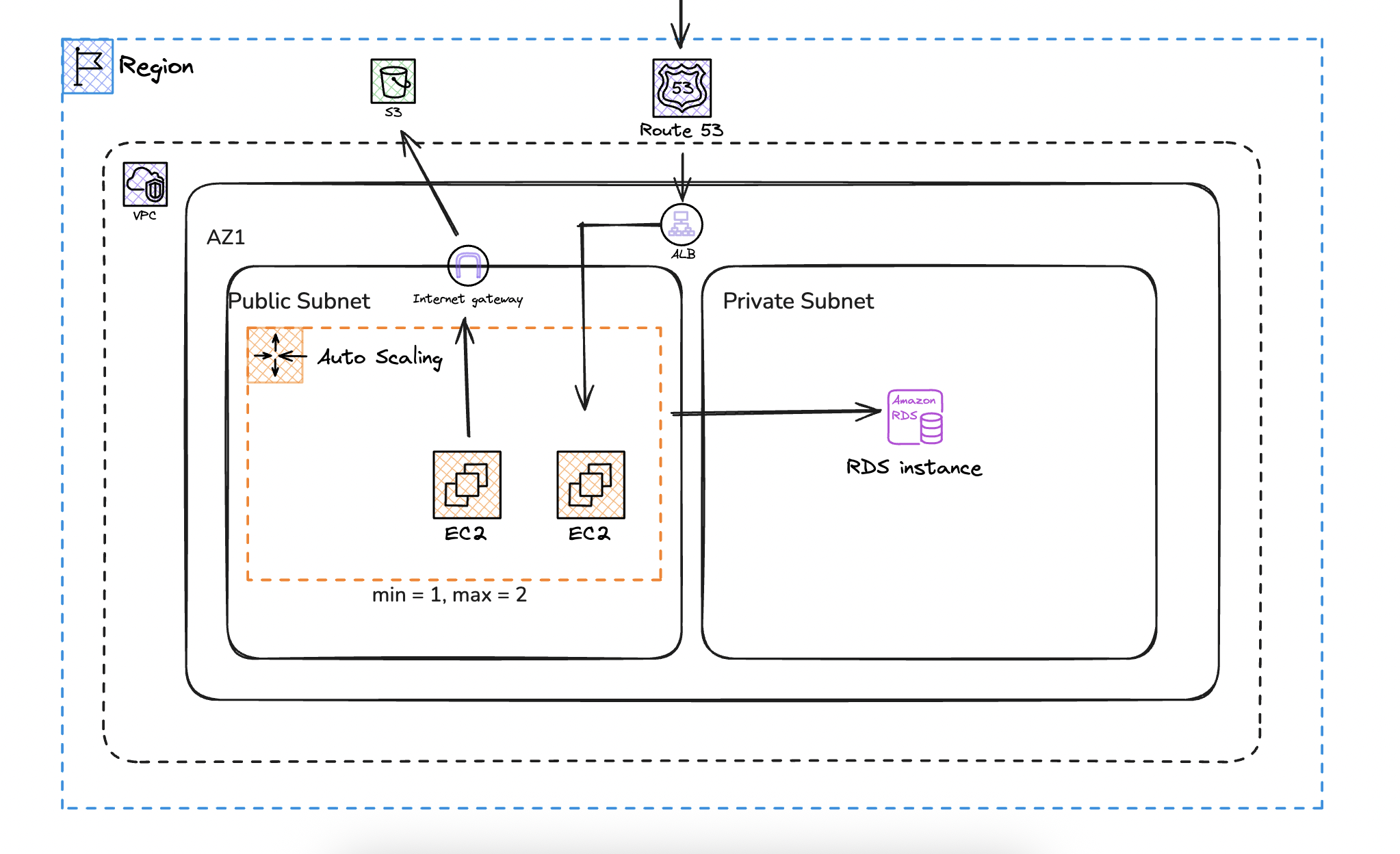
The system follows a traditional 3-tier model:
Presentation Layer
- Route 53
- Application Load Balancer with HTTPS termination (ACM)
Application Tier
- EC2 instances managed by an Auto Scaling Group
- Stateless application design
Data Tier
- Amazon RDS (PostgreSQL, Single-AZ)
- Amazon S3 for file storage
The entire deployment runs in:
- One AWS region
- One Availability Zone
- One VPC
- One public subnet
- One private subnet
This is intentionally not a highly available multi-AZ architecture.
Network Design
We deploy everything inside a single VPC in one AZ. This is the first cost driven decision.
A multi-AZ deployment would improve resilience, but it would also increase cost and duplicate certain components. For a small SaaS without strict uptime guarantees, we accept the risk of AZ failure.
Inside the VPC we define:
- One public subnet
- One private subnet
The public subnet contains:
- Application Load Balancer
- EC2 instances (via Auto Scaling Group)
The private subnet contains:
- RDS PostgreSQL instance
Why Place EC2 in a Public Subnet?
Best practice suggests placing EC2 instances in private subnets behind a NAT Gateway. That model improves isolation and reduces direct exposure.
However, a NAT Gateway introduces a fixed monthly cost. For small workloads, that cost can exceed the compute layer itself.
I considered:
- EC2 in private subnet with NAT Gateway
- EC2 in private subnet with NAT instance
- EC2 in public subnet with enhanced security
Option 1 increases cost significantly.
Option 2 adds operational management overhead.
I selected option 3.
Security is enforced through:
- ALB allowing inbound HTTPS from the internet
- EC2 allowing traffic only from the ALB security group
- SSH restricted to a specific admin IP
- RDS allowing connections only from the EC2 security group
This approach keeps exposure controlled while eliminating NAT cost. It is a compromise, not a best practice solution.
Application Tier Design
The application runs on EC2 instances managed by an Auto Scaling Group.
Configuration:
- Launch Template deployment
- Instance type such as t4g.small
- Minimum capacity: 1
- Maximum capacity: 2
- Desired capacity: 1
- Target tracking scaling policy at 60 percent CPU
Why Use Auto Scaling at This Size?
A single EC2 instance could technically handle the expected load.
We still use an Auto Scaling Group for two reasons:
- Self-healing. If the instance fails, it is automatically replaced.
- Controlled scale-out during temporary traffic spikes.
Scaling from one to two instances is not about growth. It simply gives the system some breathing room during traffic spikes.
Stateless Design Requirement
Because instances may scale horizontally, the application must remain stateless.
Session data should be stored in:
- The database
or - Signed tokens such as JWT
We intentionally avoid Redis or ElastiCache. Adding a caching layer would increase cost and complexity beyond the scope of this architecture.
Data Tier Design
The database layer uses Amazon RDS for PostgreSQL.
Configuration:
- Single-AZ deployment
- No read replicas
- No automated backups
- Placed in a private subnet
Why Single-AZ?
Multi-AZ deployments significantly increase database cost. For this scenario, the added resilience is not justified.
If the Availability Zone fails, the application goes down. That risk is accepted.
Why Disable Automated Backups?
Automated backups increase storage usage and cost.
For a serious production system, backups are a must. In this budget setup, we are choosing not to include them and accepting the risk.
Budget architecture always involves tradeoffs. This is one of them.
Object Storage Strategy
File uploads are stored in Amazon S3.
- Private bucket
- Access via pre-signed URLs
- No CloudFront distribution
CloudFront would reduce latency and offload traffic from the application layer. However, at this scale, the additional configuration and management overhead are unnecessary.
Direct S3 access is sufficient.
Cost Optimization Summary
This architecture reduces cost by intentionally excluding:
- Multi-AZ deployment
- NAT Gateway
- Read replicas
- Automated database backups
- Monitoring alarms
- CDN layer
Everything we removed either cuts recurring cost or reduces operational overhead.
The result is a clean 3-tier architecture that remains scalable but does not over invest in resilience that the workload does not require.
Known Limitations
This design has clear limitations:
- AZ-level failure results in full downtime
- No automated database recovery
- Limited horizontal scaling ceiling
- No advanced observability
- Public subnet exposure for application instances
These are not oversights. They are decisions.
When to Upgrade This Architecture
As the SaaS grows, the first upgrades should be:
- Move EC2 instances into private subnets
- Introduce a NAT Gateway
- Enable automated RDS backups
- Add Multi-AZ for the database
- Introduce CloudFront for static and file delivery
- Add monitoring and alerting
The key idea is gradual evolution. Architecture should grow with business requirements, not ahead of them.
Final Thoughts
Budget architecture is not about cutting corners blindly. It is about understanding risk, accepting certain limitations, and avoiding unnecessary cost for unused resilience.
For a small SaaS with moderate traffic and no strict uptime guarantees, this 3-tier design provides structure, scalability, and operational simplicity without over engineering.
It is not perfect.
It is intentional.